Request one Trial key to access all tools for 10 Days

ExcelAnalyzer

ExcelCompare

ExcelScenario
- License key created
- No Credit Card or Purchase Required
- Trial is Fully Functional with No Limitations
- Compatible with Excel 2013 to Office 365
- Supports 32-bit & 64-bit Windows 10+
- Complete privacy, Spreadsheet data stays local and never shared or accessed
- Handles large spreadsheets effortlessly
- Multi-language support with regular free updates
- Not available for Mac (Achieve with a Windows emulator or Virtual Machine)

Start Your Trial Now, 100% Commitment-Free
Maarten Bessems MSc 
Director Spreadsheetsoftware
Thank you , for registering
1. Download the Setup
Fix spreadsheet errors
2. Activate Your 10-Day Trial
This license key can be used on 2 devices (e.g., private and work) or shared with a colleague or friend.
Loading...
- Valid for ExcelAnalyzer, ExcelCompare & ExcelScenario
3. We have also emailed the installation details
If you can’t find it, search for ‘Request: Free 10-Day Trial’ in your inbox or SPAM folder.
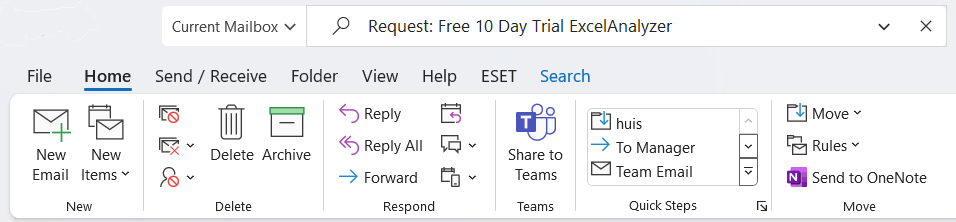
4. Need More Time or Licenses?
Need 10 more days to test or 5-10 extra licenses for your team?
Email us at sales@spreadsheetsoftware.com, and we will make it happen.
5. Installation Video
6. Installation Manual
7. Facing issues?
- If you have issues installing ExcelAnalyzer or company policies block it, try installing on your personal device.
- Contact support@spreadsheetsoftware.com for any installation questions.
- This license key can be used on 2 devices (e.g., private and work) or shared with a colleague or friend.
8. More info
- You will be asked to accept the End User License Agreement during the installation process.
- You can review it beforehand by clicking the following End User License Agreement link.
- The install and uninstall procedure can be found in our installation guide.
- The trial can be installed on a maximum of 2 computers using the same license key.
- This way, it’s possible to install it on your business + home computer.
9. FAQ
Download the installer from our website, run the setup file, and follow the on-screen instructions.
Ensure you have administrative rights, close all Excel instances, and disable antivirus temporarily if it’s blocking the installation.
Company policies might restrict software installation. Try installing it on a personal device or contact your IT department for approval.
ExcelAnalyzer requires Windows 10 or higher and Microsoft Excel (2016 or later).
Ensure the add-in is enabled under Excel’s Options > Add-Ins. If it’s not listed, try reinstalling.
Yes, the license allows installation on two devices, such as a work and personal computer.
Open ExcelAnalyzer, click on the activation prompt, and enter your license key.
Close all Excel instances before running the installation.
Currently, ExcelAnalyzer is only compatible with Windows.
Restart your computer, ensure all Excel instances are closed, and run the installer again as an administrator.

 NL
NL  Skype: